An unofficial blog that watches Google's attempts to move your operating system online since 2005. Not affiliated with Google.

Send your tips to gostips@gmail.com.

January 31, 2014

YouTube's Center-Aligned UI, Ready For Launch

YouTube continues to refine its center-aligned experimental interface, first spotted in July. The latest tweaks include a menu button placed next to the YouTube logo, a gear button placed next to the "upload" button and a sidebar that remembers the latest display state.


Just like in the previous iterations, the header is sticky and the layout is center-aligned.


The homepage uses carousels and shows contextual menus that let you customize the sections.


YouTube also shows a tour guide, which means that the updated interface is almost ready to be released for everyone.


Here's how you can enable the experimental interface. If you use Chrome, Firefox, Opera, Safari or Internet Explorer 8+:

1. open youtube.com in a new tab

2. load your browser's developer console:

* Chrome or Opera 15+ - press Ctrl+Shift+J for Windows/Linux/ChromeOS or Command-Option-J for Mac

* Firefox - press Ctrl+Shift+K for Windows/Linux or Command-Option-K for Mac

* Internet Explorer 8+ - press F12 and select the "Console" tab

* Safari 6+ - if you haven't enabled the Develop menu, open Preferences from the Safari menu, go to the Advanced tab and check "Show Develop menu in menu bar". Close Preferences and then press Command-Option-C to show the console.

* Opera 12 - press Ctrl+Shift+I for Windows/Linux or Command-Option-I for Mac, then click "Console".

3. paste the following code which changes a YouTube cookie:

document.cookie="VISITOR_INFO1_LIVE=LlWIQlLwL_Y; path=/; domain=.youtube.com";window.location.reload();

4. press Enter and close the console.

To go back to the regular interface, use the same instructions, but replace the code from step 3 with this one:

document.cookie="VISITOR_INFO1_LIVE=; path=/; domain=.youtube.com";window.location.reload();

{ Thanks, Rubén. }

January 29, 2014

Google Sells Motorola to Lenovo

Google's decision to sell Motorola Mobility to Lenovo for $2.91 billion is even more surprising than Google's acquisition of Motorola Mobility for $12.5 billion in 2011.


"Lenovo will now acquire world-renowned Motorola Mobility, including the MOTOROLA brand and Motorola Mobility's portfolio of innovative smartphones like the Moto X and Moto G and the DROID™ Ultra series. In addition to current products, Lenovo will take ownership of the future Motorola Mobility product roadmap. Google will maintain ownership of the vast majority of the Motorola Mobility patent portfolio, including current patent applications and invention disclosures."

Motorola's patents weren't that valuable, Google didn't manage to make Motorola profitable, it started to compete with the other Android OEMs and sold Motorola at a loss. Still, why not try harder to make Motorola shine once again? Why admit defeat and show that your strategy was wrong?

I think the answer can be found in Google's licensing agreement with Samsung:

"Samsung Electronics and Google Inc. furthered their long-term cooperative partnership with a global patent cross-license agreement covering a broad range of technologies and business areas. The mutually beneficial agreement covers the two companies existing patents as well as those filed over the next 10 years."

Samsung is the biggest Android OEM and a switch from Android to Tizen would be a very bad news for Google. If Samsung used its dominant position and asked Google to get rid of Motorola, Google didn't have other options.

Motorola is a lost bet, Google showed that the health of the Android ecosystem is more important than owning Motorola.

"Lenovo has the expertise and track record to scale Motorola Mobility into a major player within the Android ecosystem. This move will enable Google to devote our energy to driving innovation across the Android ecosystem, for the benefit of smartphone users everywhere. As a side note, this does not signal a larger shift for our other hardware efforts. The dynamics and maturity of the wearable and home markets, for example, are very different from that of the mobile industry. We're excited by the opportunities to build amazing new products for users within these emerging ecosystems," said Larry Page, Google's CEO.

Apparently, Motorola's Advanced Technology Group will continue to work at Google. "That means the Ara modular smartphone concept, as well as sensors you swallow and passwords you tattoo on your skin. The Advanced Tech team is headed by one-time Defense Advanced Research Projects Agency director Regina Dugan, and has been behind some of the more sci-fi things that Google has demonstrated since acquiring Moto's mobile biz."

{ Thanks, Jérôme and Tolis . }

Updated Stock Card in Google Search

Google's stock card that's displayed when you search for [GOOG], [TSLA], [Microsoft stock] and other similar queries is now a lot bigger. Tabs are placed above the chart and you can get the stock price at any time by mousing over the chart or tapping it.


Drag the dotted line to get the price variation.


Another change is that the links to Google Finance, Yahoo Finance and MSN Money have been removed.

{ Thanks, Jérôme. }

January 28, 2014

An Important Notice From Gmail

It's the first time I see an important notice in the mobile Gmail interface. Here's the message:

You may have been impacted by a recent issue in Gmail that inadvertently caused some actions (e.g. delete, report spam) taken while viewing a message to be applied to a different message. The issue occurred between January 15 and January 22 and is now fixed.

We encourage you to check your Trash and Spam folders before February 14, 2014 for any items you did not intend to delete or mark as spam and move them back to your inbox. We apologize for any inconvenience.


I couldn't find other references to this notice, so it's very likely that a very small percentage of Gmail users got it. It's interesting that the message is not displayed in the desktop Gmail, I only see it in the mobile Gmail interface.

Update. More information from Google:

"The issue affected users' actions only in Gmail for iOS, Gmail in a mobile browser, and Gmail Offline. The cause of the issue was a bug in a software update to Gmail on January 15. Once the issue was reported to the Gmail engineering team, they identified the root cause and issued a fix on January 21, and identified the users whose messages may have been incorrectly placed in Trash or Spam folders. The Gmail engineering team performed an internal review and is implementing a series of measures to address the source of the issue, improve early detection of these types of problems, and help prevent recurrence."

{ Thanks, Lukas Karlsson. }

January 26, 2014

Google Answers Complicated Questions

Google used to only answer simple questions like "who's the prime minister of Canada?" or "what's the population of China?". Thanks to the Knowledge Graph project, Google can answer more complicated questions like "who played Batman?", "what's the latest album of Celine Dion?", "what are the main attractions in Spain?".

Now Google shows direct answers for even more complex questions, but this seems to be limited to the US. Here's an example of question that doesn't have a definitive answer: "what's the distance between Earth and Mars?". I picked a shorter version of the query: "distance to the Mars." Google shows a snippet from a page that answers the question and highlights the distances. Usually, the page is in the first 10 search results and Google shows an extended snippet.


Here's another question: "why is the sky blue?".


Why is the Red Sea called this way? Google has the answer.


Google also answers: "how many work days in a year?", "who owns Lancia?", "who ended world war 2?", "who celebrates presidents day?", "how many countries are there?".


The answers aren't always accurate and sometimes they're incomplete (Will Smith has 3 kids):


While Google's quick answers are often useful, it's a good idea to check if they're accurate.

January 25, 2014

A Google Experiment Hides Knowledge Graph Sidebar

Google has an experiment that hides the Knowledge Graph sidebar, so it no longer shows information about famous people, companies, plants, cars, movies, books and more.


To try this experiment, install a cookie manager extension like "Edit This Cookie" for Chrome or Cookies Manager+ for Firefox, go to google.com and change the value of the NID cookie to:

67=Pj2b01uyf7hJnPvNoPECEnzlbCoXch_13GxuSVeSSyRdm_irfKzVaizXIE5svj3Qw1985iU4waenQh_Qy-BrE4WOtZ5Zoz9T4Kl1e1DtwJL4Xy0-JBcW_Z9IOKdd1H5Z


If you use "Edit This Cookie", don't forget to click "Submit changes". Delete the NID cookie to opt-out from the experiment.


{ Thanks, Rubén. }

Google Hides Too Many Search Results

This is a strange bug. For many navigational queries, Google only returns about 100 search results and shows a message like this: "In order to show you the most relevant results, we have omitted some entries very similar to the 117 already displayed. If you like, you can repeat the search with the omitted results included." If you click the link, you'll be sent back to the first page of results and you'll be able to see more than 100 results (but not 1000). You can also add "&filter=0" to the search URL.


Changing the number of results to 100 in Google's settings page makes this more obvious: only 35 results for [cnet].


While the duplicate filter is not new, it was used to hide results that were redundant (for example: the same press release published by multiple sites). It's hard to believe that Google can't find more than 117 relevant results for [Google], 120 results for [Facebook], 86 results for [YouTube], 75 results for [Yahoo] and [Wikipedia].


When you search for [Yahoo], Google returns a lot of results from yahoo.com and Google's duplication filter stops showing results because they appear to be redundant. There's a conflict between two opposite principles: showing diverse results and showing many results from the most relevant sites.

Here's a page of almost identical search results that probably triggered the filter:


Another issue is that there are many spam pages, irellevant results and pages in foreign languages. Here are some examples for [Amazon]:


Some irrelevant results for [YouTube]:


Google needs to fix this bug and show more diverse results.

{ Thanks, Joren. }

Distance Card in Google Search

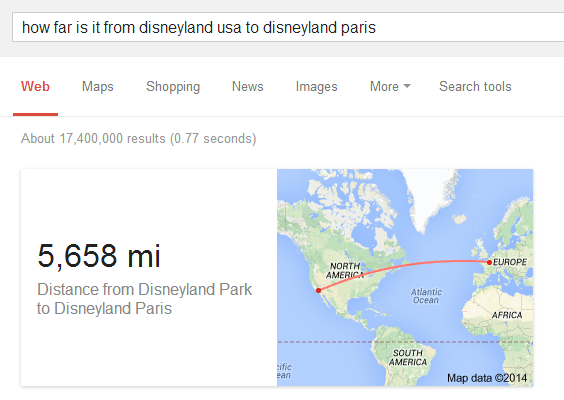
A few months ago, I wrote about Google's directions card. You can find the distance between two places and the driving directions directly from Google Search. Just search for [directions from START_ADDRESS to END_ADDRESS] or [distance from START_ADDRESS to END_ADDRESS].

But what happens when Google can't provide driving directions or there's no way to get from A to B by car? Google has a backup card that's now displayed when you search for [distance from START_ADDRESS to END_ADDRESS] and there are no driving directions. Here's an example: [distance from Easter Island to Galapagos Islands].


Another example: [distance from New England to England].


"The next time you're killing time with friends or family, name two spots on the planet - say, Hawaii and Siberia. Get everyone’s best guess on exactly how far apart they are - 2,000 miles? 5,000? 8,000? Then pull up the Google Search app on your phone and ask, 'How far is it from Hawaii to Siberia?', and there's your answer. (This 'as the crow flies' distance is a new Google Search feature that works for far-flung locales, beyond what you can drive or walk)," explains Google.

There are many ways you can ask Google:

* distance from A to B
* distance A to B
* distance between A and B
* miles from A to B
* miles A to B
* how far is it from A to B?
* how far is it between A and B?


Here's a different example: [how far is it from Amman to Damascus]. This time, Google can't provide driving directions (unlike Bing).


Unfortunately, I couldn't find a way to switch from miles to kilometres without having to do an additional conversion.

January 23, 2014

Google Streamlines Search Options

Google removed a few specialized search options that were usually displayed in the "more" drop-down: recipes, patents, discussions, blogs, places. The list of links to services like Maps, Images, News, Flights, Shopping is reordered based on your query. This isn't a new idea, it was implemented a long time ago by Google, but now it's used more often.


{ Thanks, Rubén and Max. }

Chrome Photo Wall?

There's a weird page at chrome.com/photowall/ which only shows an input box for entering a password. The title of the page is "temp login". A photo wall is a gallery of photos, so this could be a Chrome experiment that shows your photos in an interesting way, maybe using WebGL.


Chrome.com is a domain owned by Google since 2012 and it's used for various Chrome-related experiments, games, promotions and services like Chrome Maze, Roll It, Racer, Super Sync Sports, Give a Chromebook, Good to Know.

The domain was previously used by "Chrome Systems Inc/DealerTrack, Inc. which notified customers in March that as of  September 1, 2012 they will stop using the domain name Chrome.com and use the domain name Chromedata.com instead". Some pages created by the previous owner are still indexed by Google, even if they no longer exist.

Update (March 2014): Chromecast Photowall is now live.

{ Thanks, Florian K. }