Posts

Showing posts with the label tips

Install Firefox 4 beta

Execute following commands to install firefox 4 beta. sudo add-apt-repository ppa:ubuntu-mozilla-daily/ppa sudo apt-get update sudo apt-get -y install firefox-4.0 New features offered by Firefox 4 New Tab Location - Tabs are given top visual priority for more efficient and intuitive browsing. Switch to Tab - Navigate more easily by switching to open tabs from your Awesome Bar. Firefox Button - All your menu items are in a single button for easy access and reduced clutter. Apps Tab - Take sites you always keep open—like Web mail--off your tab bar and give them a permanent home in your browser.

Shortcut to add ppa repository

There is an easy command line way to add PPA repository and fetch GPG keys automatically. sudo add-apt-repository ppa:<repository-name> Replace repository name with relavent PPA repository. For example if you want to add and setup gpg keys for kubuntu-experimental execute following command. sudo add-apt-repository ppa:kubuntu-experimental

apt-cacher-ng - chache deb packages and sources.

To this date installing apt-cacher-ng is the most simple way to setup apt proxy in ubuntu. Install apt-cacher-ng sudo apt-get -y install apt-cacher-ng Lets call the system which has apt-cacher-ng as server and other systems that are going to use this cache as client. After installing the apt-cacher-ng on the server you have to make sure server it self uses this apt-proxy. You can do this by creating a file called /etc/apt/apt.conf.d/01proxy and enter following line and save the file. Acquire::http { Proxy "http://127.0.0.1:3142"; }; Now open terminal in client systems and create the same /etc/apt/apt.conf.d/01proxy file and enter the following code and save the file. Acquire::http { Proxy "http://<server ip address>:3142"; }; Replace "&lt server ip address &gt" with real server ip address. That's it all your apt fetch and updates will go through your apt proxy and you will save tons of bandwidth if you have multiple...

nethogs - Monitoring per application bandwidth usage on ubuntu

nethogs allows you to see which application is consuming your network bandwidth. It has conventional interface like top command so lot of details about each process is displayed in tabular format. nethogs is available in ubuntu universe so no need of adding extra repo lines. Install nethogs sudo apt-get -y install nethogs Usage sudo nethogs <network interface name for eg: eth1>

SmarterFox : Imporove your browsing experience

Image
SmarterFox learns site pagination systems and allows you to view other pages without even a single click. These are the features offered by SmarterFox. SmarterFox makes your address bar smarter by integrating Google search with awesome bar(address bar). Save flash based content. There is a quick launcher which allows you to open your favorite sites. Search selected text in Google, Wikipedia and other sites.

PySide : Nokia's offical python bindings for QT

Nokia started working on providing official python bindings for QT after talks with PyQt creators riverbank failed. The new API is called PySide and it's available under LGPL license and going to maintain API compatibility with PyQt thus ensuing porting of existing PyQt applications with minimal or no changes. Nokia is going to provide pyside as an alternative option to develop mobile applications for next Maemeo 5 devices. Get pyside

Enable Keyboard shotcut for restarting xserver

Latest version of Ubuntu comes up with the handy shortcut to restart xserver using keyboard. Here is a way to enable that option. First install dontzap package. sudo apt-get -y install dontzap Now add following three lines to /etc/X11/xorg.conf file. Section “ServerFlags” Option “DontZap” “false” EndSection After restarting Ubuntu you can use Control+Alt+Backspace keyboard option.

Benchmark, Get System Information

Image
Hardinfo allows you to benchmark and get system information. Following types of benchmarks are performed to access the system performance. ZLib Fibonacci MD5 SHA1 Blowfish FPU Raytracing These benchmarks doesn't cover all aspects of the system but it's nice to start somewhere. Hardinfo also collects the following info and generates the html report. Operating System Info File system Info Network Info Hardware info (Processor, Memory, PCI, USB, Printers, Sensors, etc...) Install hardinfo sudo apt-get -y install hardinfo

iotop - Monitor Disk I/O by Process

Image
iotop allows us to watch processes which are currently accessing the disks. iotop also shows I/O transfer speeds by process and thus it becomes easy to pinpoint what's going on. Installation Use following command to install iotop . sudo apt-get -y install iotop Now you can use iotop command inside terminal to launch iotop.

Windows key as shortcut in gnome keyboard shortcuts

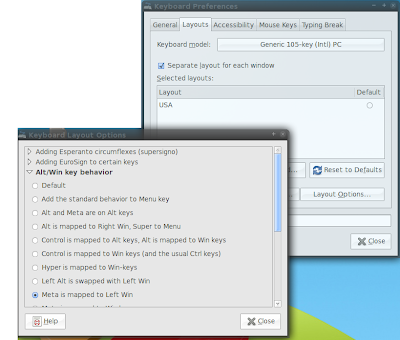
Image
Ever tried using win key( super ,meta) as shortcut in gnome keyboard shortcuts? It will take it as super-key and not modifier. Do the following to use win/super/meta/mod4(different names for same key btw) for shortcuts in gnome. Change Win key behaviour in gnome. Select "Alt/Win key behaviour" by selection doing selecting following actions. Select "Meta is mapped to Left Win" from the list. preferences -> keyboard -> layouts(tab) -> Layout Options(button) -> Alt/Win key behaviour(dropdown list item) Now select "preferences -> keyboard shortcuts " and select the action you want to change and press win+key as you do normally. You will see Mod4+key . And it works now :)

Multi touch for any,all synaptics touchpad

Multi-touch became trendy after iphone came up with it. We are seeing many new laptops with multi-touch. At hardware level, there is nothing special that you need, to make multi-touch work. You can also do two-finger scroll and two-finger tap to right/middle click. Also, three-finger tap, but, for me it is very hard to press three fingers at the same time(1 out of 10). Create new file gksudo gedit /etc/hal/fdi/policy/11-x11-synaptics.fdi Paste the following code into the file and save it. <?xml version="1.0" encoding="ISO-8859-1"?> <deviceinfo version="0.2"> <device> <match key="info.capabilities" contains="input.touchpad"> <merge key="input.x11_driver" type="string">synaptics</merge> <merge key="input.x11_options.SHMConfig" type="string">On</merge> <merge key="input.x11_options.EmulateTwoFingerMinZ" ...

Wifi on Acer Laptops

A few months back I bought an acer aspire 4520 laptop. Since then I wasn't able to make wifi work on my laptop. For me madwifi doesn't work at all and ndiswrapper works occasionally. Recently I went out bought Netgear USB wifi stick and it worked out of box. No need to install any drivers or anything. Hope jaunty will have proper support for atheros chip sets.

.recently-used.xbel - The XML Horror

xbel stands for XML Bookmark Exchange Language and .recently-used.xbel file contains list of recently opened files. This file is opened and parsed every time you open a file inside GTK application like eog (Eye of Gnome Image Viewer). This file could grow larger (some times megabytes) and affect the responsiveness of the GTK application. I don't know why GTK team chose XML format rather than something like SQLite which offers faster retrieval and lookup of entries. Assumptions aside lets disable this fracking thing and make your GTK applications much more responsive. Disable .recently-used.xbel You should have either .gtkrc or .gtkrc-2.0 in your home directory if not create a new file and add following line to it. gtk-recent-files-max-age=0 Now restart your gnome environment for faster desktop environment.

mtop - MySQL Monitor

mtop allows you to monitor your MySQL instance in real-time. It shows you uptime of the instance, number of queries executed per second, slow queries, number active threads, etc. Installation sudo apt-get -y install mtop Use following command to watch your MySQL server stats with 1 second refresh interval. mtop -se 1