[Website] Expose front-page thumbnail capture through PlaygroundClient - #4142
Merged
adamziel merged 7 commits intoJul 21, 2026
Merged
Conversation


Contributor
There was a problem hiding this comment.
Pull request overview
Note
Copilot was unable to run its full agentic suite in this review.
Adds a new captureSiteThumbnail() API to PlaygroundClient that captures a site’s front page thumbnail by delegating DOM rendering to the WordPress iframe (to work under Document-Isolation-Policy), and wires up the service worker + MU plugin messaging bridge to load a dedicated renderer module on demand.
Changes:
- Add
captureSiteThumbnail()andSiteThumbnailtype to the remote/client public API surface. - Implement a cross-frame capture flow via a disposable iframe + MU plugin message handler + dynamic import of a renderer module.
- Add a Playwright E2E test and service-worker routing exceptions to serve the renderer + worker assets correctly from scoped WordPress pages.
Reviewed changes
Copilot reviewed 8 out of 9 changed files in this pull request and generated 4 comments.
Show a summary per file
| File | Description |
|---|---|
| packages/playground/website/playwright/e2e/client.spec.ts | Adds an E2E test that exercises the new thumbnail API and validates output dimensions. |
| packages/playground/remote/src/lib/playground-mu-plugin/0-playground.php | Adds a trusted-parent message handler inside WordPress to dynamically import and run the thumbnail renderer. |
| packages/playground/remote/src/lib/playground-client.ts | Exposes captureSiteThumbnail() and the SiteThumbnail type on the client interface. |
| packages/playground/remote/src/lib/capture-site-thumbnail.ts | Implements the in-WordPress renderer using modern-screenshot and async yielding + encoding. |
| packages/playground/remote/src/lib/boot-playground-remote.ts | Implements the “disposable iframe” orchestration and adds the new method to the remote API. |
| packages/playground/remote/service-worker.ts | Ensures renderer/worker asset URLs are treated as app assets even when requested from scoped WordPress pages. |
| packages/playground/client/src/index.ts | Re-exports the SiteThumbnail type from @wp-playground/remote. |
| package.json | Adds the modern-screenshot dependency used by the renderer. |
💡 Add Copilot custom instructions for smarter, more guided reviews. Learn how to get started.

adamziel
added a commit
that referenced
this pull request
Jul 21, 2026
Saved Playgrounds now show a 128×96 image of their front page instead of all sharing the same WordPress mark. When no image is available, the WordPress mark uses the same subtle 4:3 frame. The website calls `captureSiteThumbnail()` from #4142 after saving and stores the result in the existing site metadata. A capture failure does not block saving or booting. Recent autosaves also keep their WordPress and PHP versions. On phones, names and details align with the top of the preview and names may use three lines. | Desktop before | Desktop after | | --- | --- | | 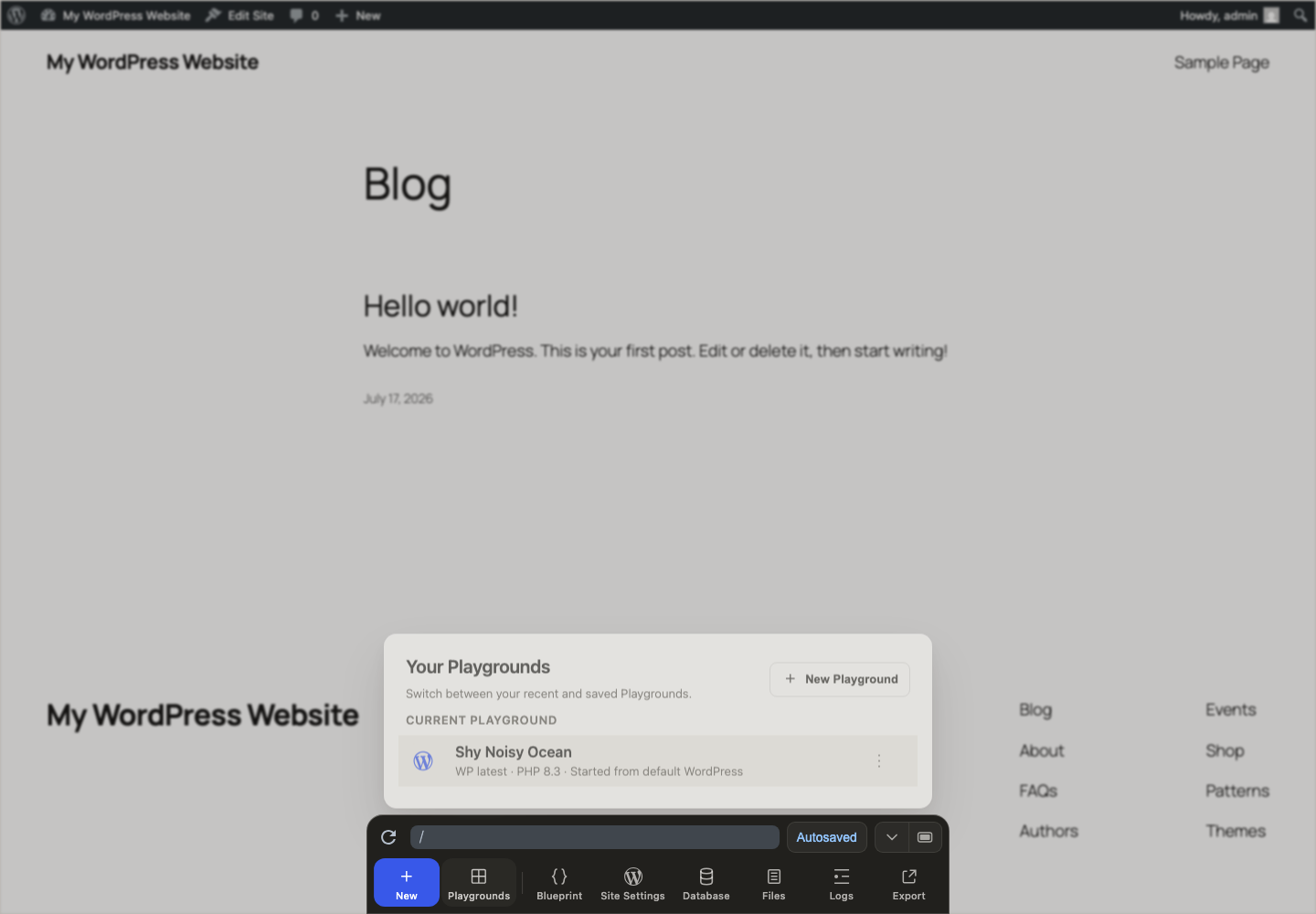 | 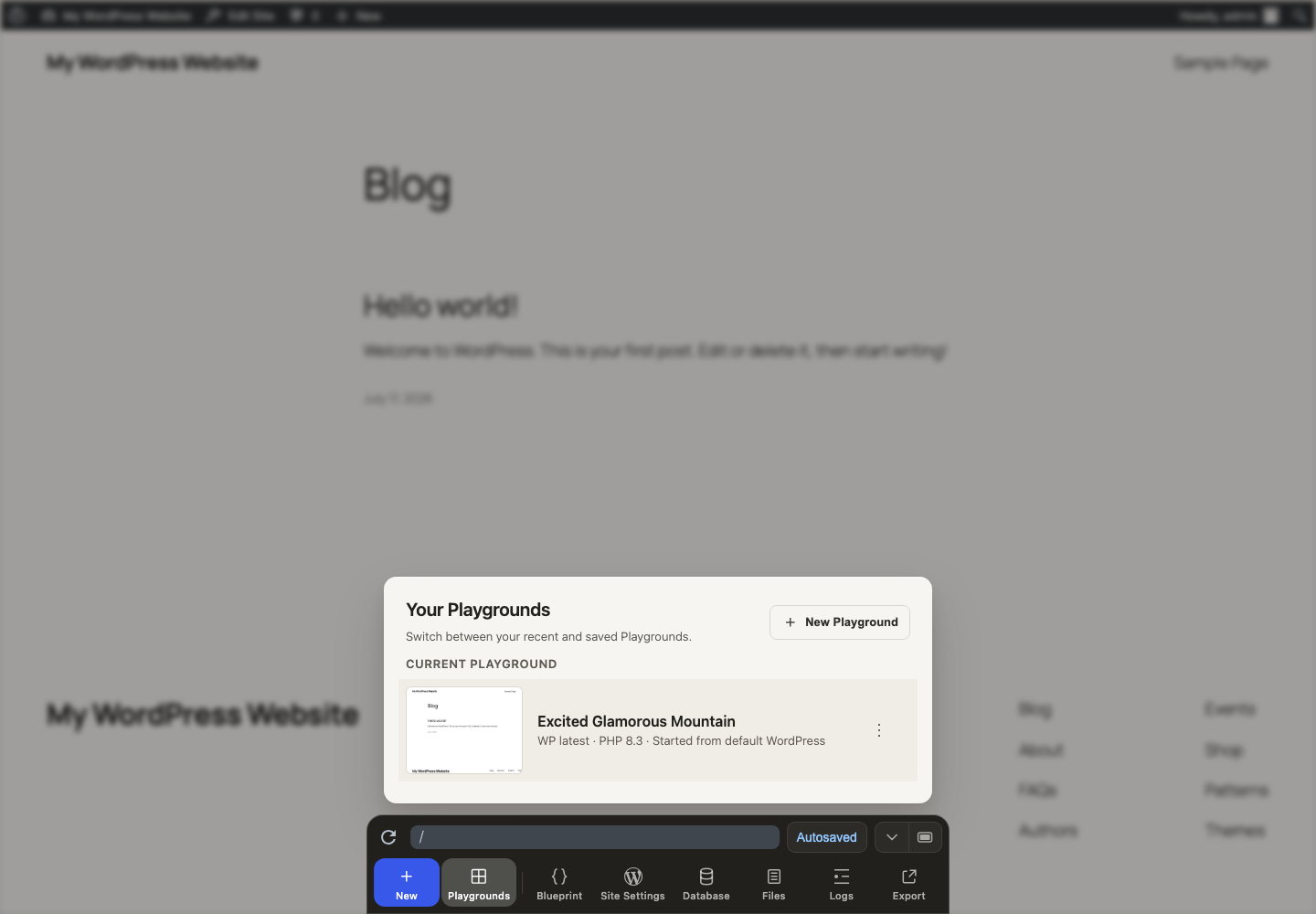 | | Mobile before | Mobile after | | --- | --- | | 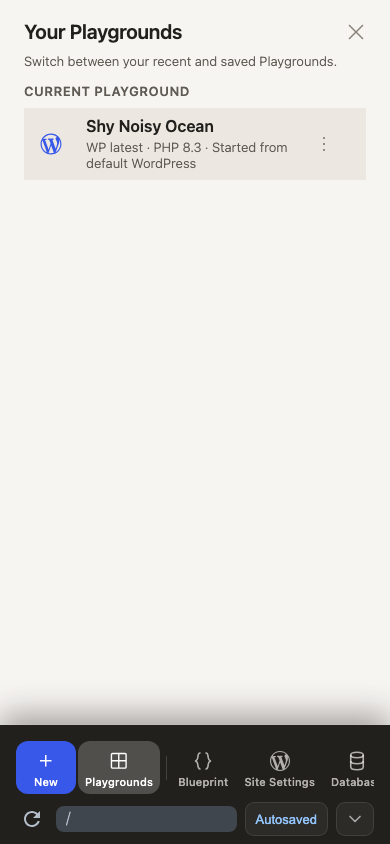 | 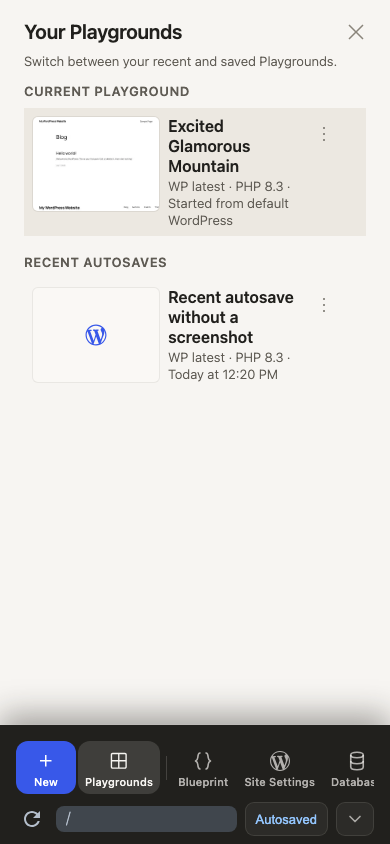 | ## Testing Save a Playground, open **Your Playgrounds**, and check that its front-page thumbnail appears. Start another Playground and check that the previous entry keeps its WordPress and PHP versions under **Recent autosaves**. Reload the saved Playground and check that its thumbnail remains.
adamziel
added a commit
that referenced
this pull request
Jul 25, 2026
…adata (#4167)

## Background

#4142 bounds page loading and gives `modern-screenshot` three seconds to
render. That prevents one capture from hanging forever. It does not
order results.

A saved Playground keeps its site metadata in `wp-runtime.json` inside
that site's OPFS directory. Every open tab has its own Redux copy of the
record, while all tabs write to the same OPFS file. #4152 made those
writes atomic: `OpfsSiteStorage.update()` takes an origin-wide Web Lock
keyed by site slug, reads the latest record, merges only the supplied
patch, and writes it back. A thumbnail update therefore cannot restore
an old name or runtime setting from that tab's Redux state.

The lock only serializes writes. It cannot know when
`captureSiteThumbnail()` started. An old iframe can finish after a newer
capture and then acquire the lock with a valid `{ thumbnail }` patch,
replacing the newer image.

## This change

Before passing a thumbnail patch to `OpfsSiteStorage.update()`, this PR
requires that the request is still the latest one for that site in the
current tab, its boot signal has not been aborted, and Redux still owns
the client that started it.

The initial OPFS copy now returns its own success result. Thumbnail
capture no longer infers that copy's outcome from
`initialOpfsSyncPending`, whose value can change independently.

Two live tabs remain valid writers. Their per-site Web Lock serializes
thumbnail updates, and the last completed live-tab write wins.

## Testing

The focused tests resolve captures out of order, replace and abort
clients, and fail an initial OPFS copy after the metadata flag changes.
This file contains hidden or bidirectional Unicode text that may be interpreted or compiled differently than what appears below. To review, open the file in an editor that reveals hidden Unicode characters.
Learn more about bidirectional Unicode characters
Sign up for free
to join this conversation on GitHub.
Already have an account?
Sign in to comment


Add this suggestion to a batch that can be applied as a single commit.This suggestion is invalid because no changes were made to the code.Suggestions cannot be applied while the pull request is closed.Suggestions cannot be applied while viewing a subset of changes.Only one suggestion per line can be applied in a batch.Add this suggestion to a batch that can be applied as a single commit.Applying suggestions on deleted lines is not supported.You must change the existing code in this line in order to create a valid suggestion.Outdated suggestions cannot be applied.This suggestion has been applied or marked resolved.Suggestions cannot be applied from pending reviews.Suggestions cannot be applied on multi-line comments.Suggestions cannot be applied while the pull request is queued to merge.Suggestion cannot be applied right now. Please check back later.
Adds
captureSiteThumbnail()toPlaygroundClient:The method loads
/in a disposable 1024×768 iframe and returns a 320×240 WebP image. It falls back to JPEG when WebP encoding is unavailable. The caller owns the result; this PR does not save it or change the Saved Playgrounds UI.The renderer uses
modern-screenshot'sdomToCanvas(). It clonesdocument.documentElement, embeds its styles and resources in an SVG<foreignObject>, draws that SVG onto a scaled canvas, and encodes the canvas withtoBlob().Why capture runs in WordPress
The remote frame cannot always read the WordPress DOM. For example, a site may send
Cross-Origin-Embedder-Policy: require-corpandCross-Origin-Opener-Policy: same-origin. Playground then usesDocument-Isolation-Policy, which blocks synchronous DOM access from the remote frame even though both frames share an origin.The MU plugin therefore receives the request from the trusted parent and lazy-loads the renderer inside the front page. It checks the source window, origin, and renderer URL. The remote frame accepts only the response with the matching request ID. Normal page loads do not download
modern-screenshot.The disposable page has a 20-second load watchdog. Once it loads, rendering has a 3-second deadline. DOM cloning and canvas rendering stay in the document, with periodic task yields. A resource worker handles supported fetches. Every result or failure removes the iframe and its listeners.
The service worker serves the marked renderer and resource worker as app assets. Without that exception, its scoped-referrer handling would redirect both requests into WordPress's virtual URL namespace, which returns a 404.
This is the first slice split from #4133. Nothing calls the API automatically yet, and this PR does not write OPFS metadata.
Testing
Open a Playground and run
const thumbnail = await playground.captureSiteThumbnail()in the browser console. Turn the result into a data URL, open it, and confirm it shows the front page as a 320×240 image. Repeat in Chrome, Firefox, and Safari.